Showing posts with label Information Technology. Show all posts

9 Best Free Alternatives to Paid Commercial Software

Instead of Adobe Photoshop, use GIMPFor professional graphic artists, substituting anything for Photoshop is akin to blasphemy. There really is no equal. But if you're an amateur looking to edit graphics without taking out a loan for the tools to do it, GIMP makes a fine stand-in. You'll get all the same pencils, airbrushes, and resizing tools, plus advanced options like plug-ins and scripts. The learning curve is most assuredly steeper, though, and you won't be able to benefit from the quite literal library of books and tutorials out there for the more popular Photoshop.
To try out GIMP, visit this link.
12 9 Best Free Alternatives to Paid Commercial Software

Instead of Microsoft Office, use OpenOffice
Microsoft Office is everywhere. Whether you work from a Mac or a PC, in India or Indiana, you're probably using Word, Excel, PowerPoint and all the other de facto office tools. That makes it all the more difficult to switch, but OpenOffice replicates almost all of the same functionality, menus, and even file formats. It may not look quite as pretty as the blue "ribbon" design Microsoft has been using since 2007, but for fans of the old office, or students who just need to jam out a paper now and then without paying Microsoft, it will do the trick. That said, some of Microsoft's most tricked-out features – like a function in Word that automatically formats a proper bibliography for you after filling in the required text fields – are missing. You'll just have to dig out that MLA manual from high school.
To try out Open Office, visit this link.
21 9 Best Free Alternatives to Paid Commercial Software

Instead of Nero, use ImgBurn
Windows alone sucks for burning CDs. Even for the most basic tasks, you're far better off with powerful disc authoring software. Nero charges $70 for its solution, but ImgBurn effectively does all the same essentials, for free. You can rip discs to image files (like ISO), build a custom disc image from files, and of course, write them to blank discs. It even supports Blu-ray, and works with an incredibly diverse array of image files. Nero 9 can technically do more – like serve as a live TV tuner – but why do you need that when you're just trying to burn CDs?
To try out ImgBurn, visit this link.
3 9 Best Free Alternatives to Paid Commercial Software

Instead of Microsoft Outlook, use Mozilla Thunderbird
The company that brought you the now-ubiquitous Firefox makes an e-mail program, too. And it's just as good. Besides handling the same e-mail formats as its Microsoft competitor, Thunderbird actually feels faster to us, uses less RAM, and like Firefox, it accepts plug-ins for all the add-on functionality you could ask for from a thriving development community. (For instance, one allows you to select a bunch of e-mails then gather the senders for one massive reply.) Like OpenOffice, it looks a little duller than the real thing, but you can skin it however you choose. The only other glaring caveat: There's no built-in calendar or task management, so if your colleagues' incoming meeting requests will fall on deaf ears. Then again, depending on your colleagues, maybe that's a good thing.
To try out Mozilla Thunderbird, visit this link.
4 9 Best Free Alternatives to Paid Commercial Software

Instead of Norton AntiVirus or McAfee VirusScan, use Avira AntiVir Free Edition
Whether you like it or not, every PC needs virus protection, and if you're not receiving regular updates, you're not protected. So next
time the antivirus software that came preinstalled on your PC hits you up for money and warns you that it's out of date because the free trial expired, uninstall that junk and download Avira. Not only is it totally free – including updates – it's some of the best virus protection available. Independent tests from AV-Comparatives.org consistently place Avira near the top of the list for detection rates. It tagged 99.7 percent of viruses in tests – compared to 99.1 percent from McAfee and 98.7 percent from Norton in the same tests. That has to burn, considering both those companies want big bucks for their AV suites. We do have to warn that the free edition occasionally hits you with a nag screen, though.
To try out Avira AntiVir Free Edition, visit this link.
5 9 Best Free Alternatives to Paid Commercial Software

Instead of Adobe Audition, use Audacity
Looking to perform some minor edits on your next podcast, or clean up pops and clicks in old audio? Audacity will do the trick for a lot less than Adobe's pricy alternative. The Swiss army knife of audio editors performs most basic tasks without flinching, but keep in mind that some must-have features will force you to go looking for add-ons. For instance, you'll need to install the LAME MP3 encoder to save files as MP3s, because legal concerns prevent the creators from including it by default. A bit of a pain, absolutely, but well worth the $350 saved.
To try out Audacity, visit this link.
6 9 Best Free Alternatives to Paid Commercial Software

Instead of Alcohol 120 or Virtual CloneDrive, use Daemon Tools Lite
Spare yourself a new spindle of blank CDs or DVDs and put those image files on a virtual drive, which tricks your PC into thinking there's actually a physical disc in it, without having to burn anything. Alcohol 120 and VirtualCloneDrive are the old standards for drive emulation, but Daemon Tools Lite pulls off the exact same trick for free. Of course, it won't burn and rip image files like Alcohol 120, but partner it up with ImgBurn and you're good to go.
To try out Daemon Tools Lite, visit this link.
9 9 Best Free Alternatives to Paid Commercial Software

Instead of Windows Vista or OS X Leopard, use Linux
We couldn't help ourselves. Even though one of these operating systems comes installed on just about every computer you can buy down at the local retailer, you'll still have to drop some serious coin to buy them separately. But you can download hundreds of different versions of Linux, in the next hour, for free. DistroWatch.com maintains our favorite list of what's popular, and Ubuntu makes one of the most user-friendly introductions to the Linux world, if you're so itching to try it.
To try out Linux, visit this link.
71 9 Best Free Alternatives to Paid Commercial Software

Instead of Civilization II, play FreeCiv
To be fair, you can pick up Civilization II (which FreeCiv most closely mimics) for about $5 if you play your cards right, but downloading FreeCiv is a lot quicker than combing bargain bins, garage sales and eBay. And unlike the original, FreeCiv has built-in multiplayer, so you can have head-to-head barbarian battles with your friends in the same style as one of the greatest turn-based games of all time.
To try out FreeCiv, visit this link.
8 9 Best Free Alternatives to Paid Commercial Software
Source: Yahoo Tech

Vopium now on Ovi Store, offers attractive call packages


Vopium, the leading international mobile communications company, has announced that its award winning mobile VoIP application is now available from the Nokia Ovi Store portal following positive user feedback from a successful listing on Nokia Download. With the addition of Nokia Ovi Store to its portfolio, Vopium is now offering applications on all major application stores including BlackBerry App World, iPhone App StoreSM, Android Market and Nokia Download.
To take advantage of significantly cheaper international mobile phone calls, all Nokia phone users need to do is simply download Vopium in one click via the Ovi Store on the handset or from the web based solution on www.ovi.com. Once downloaded, users will be able to create a Vopium account and immediately start calling international numbers, saving up to 90% on their traditional operator rates.
"Vopium on Nokia Ovi Store extends our commitment to offering all mobile users cheap, high quality international calls, said Tanveer Sharif, CEO of Vopium. "Vopium aims to help users to communicate across the globe and the Nokia Ovi Store application combined with our applications on iPhone, BlackBerry and Android helps us to bring this vision to life."
Vopium's award winning technology takes advantage of 3G, GSM and WiFi networks, and automatically re-routes calls via the cheapest available route enabling customers to save money when calling international numbers. Vopium users can also send low-cost international text messages using the standard Nokia SMS interface. Once downloaded, the Vopium application seamlessly integrates with the address book and intelligently recognises international numbers. When an international number is dialed, the call is made using the cheapest method available whilst also preserving the highest level of call quality.
Key Features of Vopium:
  • Vopium is compatible with more than 900 handsets across Java, Symbian, BlackBerry RIM, and Windows Mobile, as well as offering complete applications for the iPhone App Store, Nokia Ovi Store, BlackBerry App World and Android Market
  • Vopium is free to download at www.vopium.com
  • Vopium re-routes international calls as a local call to a Vopium gateway and then via global traffic carriers as ordinary voice traffic in order to ensure high voice quality
  • All new users are given 30 minutes of talk time and 30 international SMS for free
  • Calling internationally with Vopium can result in up to 90 percent savings versus traditional carrier rates; for an overview of current pricing, visit: http://vopium.com/tariff
  • Calls made through Vopium are always routed using the cheapest method while preserving the highest quality
  • Vopium Wi-Fi users can call each other around the world for free
  • Vopium users keep their own mobile number and SIM card, and maintain their numeric identity when making calls
  • When a user calls from their home country, a local rate may be applied by their operator
  • Synchronize and backup your contacts and calendar with Vopium Sync
Vopium is also running promotions on all the call packages making it cheapest ever calling solution available. Take for example, their "Reach Out" package which offers 2000 minutes in $ 19 making it just 1 cent per minute call to 49 popular destinations in the world including USA, UK, Australia, France, Germany, Italy and other Far Eastern countries. Their other packages like "Call India" offers 2.4 cents/min call, "Call Turkey" offers 1.9 cent/min call and "Call Pakistan" offers 3.8 cents/min call. These special packages are valid till October 31st , 2009. To know more about these packages, just check out tariff details of Vopium at here.
Via ProPakistani.PK

Oracle Announces New Mobile CRM and Social CRM Enhancements for Oracle CRM O...


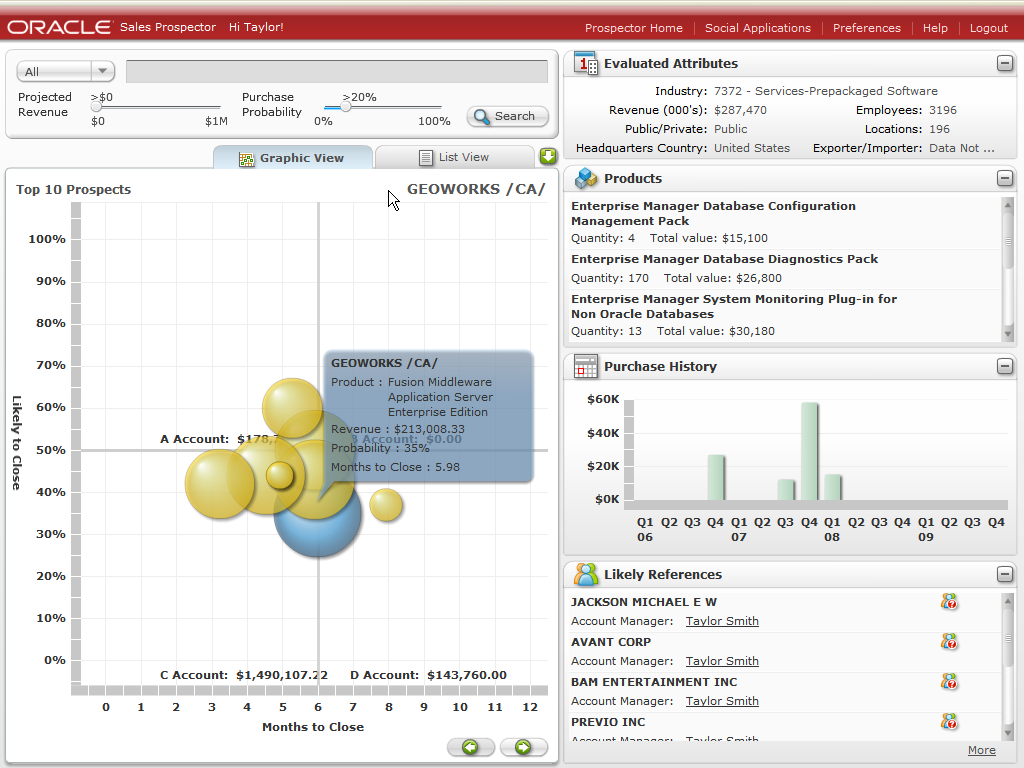
Continuing to build and expand on its industry-defining mobile CRM and Social CRM innovations, Oracle has announced the new releases of Oracle Mobile Sales Assistant 2.0 for BlackBerry and Oracle Social CRM Applications Release 3, which introduces the new Oracle CRM Sales Campaigns On Demand and enhancements to Oracle CRM Sales Library on Demand and Oracle CRM Sales Prospector On Demand."Before implementing Oracle Mobile Sales Assistant, our community education representatives lacked the ability to capture impressions immediately after a meeting and ran the risk of losing specific details," said Paul Akin, Director, Odyssey Healthcare, Inc. "Now they stay up to date with all accounts via their Blackberry devices, which helps us increase productivity and improve relationships with our referral sources."
"Oracle has spearheaded an industry-leading movement to provide sales professionals with mobile CRM and social CRM applications that reflect the day-to-day realities of selling," said Mark Woollen, Oracle Vice President of Social CRM. "The new releases of Oracle Mobile Sales Assistant 2.0 for BlackBerry and Oracle Social CRM Applications Release 3 for Oracle CRM On Demand address the highly mobile and relationship-driven elements of working and communicating within the sales cycle, enabling sales professionals to spend more time in front of their customers selling and less time back at the office seeking, logging or creating content."
Oracle Mobile Sales Assistant 2.0 for BlackBerry:
Optimized for mobile professionals, Oracle Mobile Sales Assistant is a simple, highly intuitive application designed to help users collaborate with colleagues and customers, complete frequent tasks while out in the field and close deals more quickly while on the road. Oracle Mobile Sales Assistant 2.0 for BlackBerry provides even more ease-of-use features and introduces support for 12 languages, opening the power and utility of mobile CRM to new markets and users.
Enhanced data caching in Oracle Mobile Sales Assistant 2.0 for Blackberry now makes more information immediately available, with or without a data connection. The ability to log emails and calls to Oracle CRM On Demand and directly access appointments, tasks and contacts enables Oracle Mobile Sales Assistant 2.0 users to save time and increase productivity with insight anytime, anywhere. Support for additional BlackBerry devices now includes Tour, 8900 and Storm.
Oracle Social CRM Applications Release 3:
Oracle Social CRM Applications are highly intuitive, focused applications that harness the latest Web 2.0 technologies, and empower sales users to be more effective and productive by leveraging the knowledge and experience of their broader community to identify qualified leads, develop sales campaigns and collaborate with colleagues to close more deals, with no data entry required.
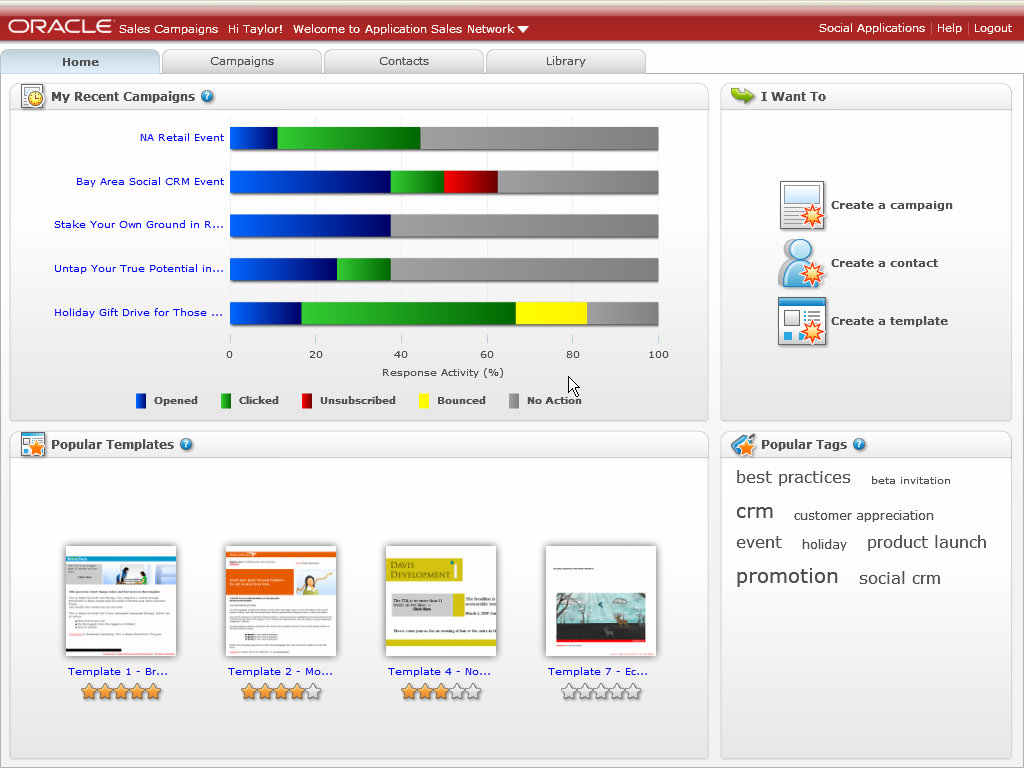
The new Oracle CRM Sales Campaigns On Demand introduced in Oracle Social CRM Applications Release 3 enables sales professionals to create professional quality campaigns by leveraging an easy-to-use editing tool for existing templates within their social networks or to design a new template. Sales users can also determine the best templates and images to adopt based on user ratings, reviews and historical response rates.
Oracle CRM Sales Campaigns On Demand includes real-time campaign results tracking, with detailed insight on when an email is opened or clicked, cannot be delivered due to an invalid address, or when a user has unsubscribed.
Oracle CRM Sales Library On Demand now includes support for Microsoft Word, integration with Oracle CRM On Demand Release 16 to accelerate sales cycles, access control for better compliance, more efficient tags and filters, and a message board for members to get a quick view of activity within their social networks.
Oracle CRM Sales Campaigns On Demand delivers powerful and easy adherence to compliance laws, so sales users can honor customers preferences to opt-out of emails.
Oracle CRM Sales Campaigns On Demand
Oracle CRM Sales Library On Demand
• Oracle CRM Sales Prospector On Demand
Oracle CRM Sales Prospector On Demand
Oracle Mobile Sales Assistant
Via ProPakistani.PK

Banking for the Unbanked – Mobile Banking Steps up!


I have been talking about mobile commerce and mobile banking for quite some time now. My recent article on the topic had been on the possibility of the telecom companies posing a challenge to the traditional banking industry in the mobile domain.And now, this week, we will be witnessing mobile banking taking a new turn. As, we will see heads joined together to figure out innovative ways to cater to the mobile banking needs of today's tech-savvy customer and easy to use services for the unbanked populace of Pakistan.
I spoke of stats earlier: Pakistan has 20 million bank accounts as opposed to over 90 million mobile subscribers. All of whom are potential mobile banking customers. There seems to be a race to tap in to this market.
If it happened as per schedule, this week, we will witness the launch of "EP" by Telenor Pakistan. EP will be a unique experience altogether. We might also be seeing something coming in from one of the leading banks in Pakistan in collaboration with one of the most famous telecom brand-names in Pakistan.
With that said, October 14th and October 15th will be very important days for the years to come as I believe our banks and telecom operators might be setting benchmarks for the way things will work in the future.
There seems to be, I admit, a sense of secrecy around this particular post. It is to preserve the right of the marketing teams of the banks and telecom operators to keep the launch 'special' for everyone.
We cannot, however, rule out the element of confusion that exists over the many ways mobile-banking can be implemented. Everyone has different ideas and more importantly, differing interests associated with this business. The PTA and the State Bank of Pakistan could ease this problem by stepping in with a standardized model to be followed at all costs for basic banking while allowing banks and telecom operators to experiment with value-added services.
It is indeed delightful for me to see, like I had spoken about it earlier, a unique collaboration between banks and telecom operators to tap in to a market which has remained more-or-less unexplored throughout the world and especially in Pakistan.
What is to be seen, however, like Telenor has decided to cater to the unbanked and rural areas of Pakistan (just as they focused their core telecom operations on rural areas) – how other banks and operators develop business models to allow those who don't have bank accounts to use their handsets for basic financial services.
For now, mobile-banking is hot. We can assume sustainable growth in this domain with concerted efforts to increase awareness and educate the masses on the use of these services. How the banks and operators make it a 'need' for their customers is just about to be unveiled.
Via ProPakistani.PK

Al-Shaymaa, to Launch Hi-Tech Services in Pakistan


Al-Shaymaa (Private) limited a subsidiary of Al-Shaymaa FZE; a UAE based investment group has launched its operations in Pakistan.Al-Shaymaa has entered into the Pakistani market with a diversified portfolio of technology related businesses. With a prime focus on hi-tech solutions for security and surveillance, the group portfolio of businesses include: complete Fleet Management System, Vehicle tracking and Anti-theft solutions, IP based surveillance systems and integrated Education Management System (EMS) for IT & Education industry.
Al-Shaymaa is investing heavily in infrastructure of an extensive network spreading all over Pakistan with offices in Karachi, Lahore and Islamabad.
H.E Abdullah Al Daboos, Chairman Al-Shaymaa group in his statement said that Al-Shaymaa is entering in Pakistani market with a vision to serve it with our strength of strong technological know-how and capability to provide the simplest solutions to the most complex of problems.
Via ProPakistani.PK

The Rise of Email Marketing in Pakistan


E-mail marketing is a form of direct marketing which uses electronic mail as a means of communicating commercial or fund-raising messages to an audience. In its broadest sense, every e-mail sent to a potential or current customer could be considered e-mail marketing. However, the main uses of it are to:
  • send e-mails with the purpose of enhancing the relationship with your current or previous customers and to encourage customer loyalty and repeat business,
  • send e-mails with the purpose of acquiring new customers or convincing current customers to purchase something immediately,
  • add advertisements to e-mails sent by other companies to their customers.
The basic concept of email marketing is simple, mainly a mailing list is used to send direct messages to a large group of potential customers.
It has many advantages such as
  • being low cost,
  • return of investment can be tracked,
  • delivery time is short,
  • can reach specific audience
  • and many others.
Now a days, companies in Pakistan are seeing its importance. There are many firms doing email marketing, while they are doing good – but they forget to add a very important feature of "Self un-subscribe" at the end of email, which is very important or the email will be termed as SPAM.
Following are two advertisements below which I received through email:
buZZz fashion final The Rise of Email Marketing in Pakistan
BBWS Final 692x1024 The Rise of Email Marketing in Pakistan
The first Ad is about a new clothing store located in Lahore and the second one is about a charity funded school. So in some way both of the Ads are related and meaningful to us. Like this, ads about restaurants, websites, and other businesses are being directed to us (the potential customers).
However, sending an email without the consent of receiver is illegal, and an email without Un-Subscribe Link is another offense, which should be kept in mind while advertising.
Both of above two elements are missing at most of times, making these marketing emails an offense – and can be charged under Cyber Crime Act of Pakistan.
Pricing: In Pakistan email campaigns are charged on per shoot (or per one email) basis. Usually email-marketers charge from Rs. 2,000 to Rs. 5,000 per email shoot. In one email shoot, they say that 300,000 to 500,000 users will get your message.
From where marketers get your Email: There are companies in Pakistan that offer 1 million email ids in a CD, that is easily available for Rs.  7,00 to Rs. 1,000.
Via ProPakistani.PK

Pakistan’s first Antivirus “Instant Virus killer”


index 01 Pakistans first Antivirus Instant Virus killer
Instant virus killer is not only an anti-virus but this software also has capability to backup and recover infected or lost data within seconds!This powerful anti-virus is made by two Pakistanis Hafiz Usman and Mr. Imran.
While in an interview to Aaj TV, Mr Hafiz Usman told that "To develop an anti-virus, it was not an idea it was only an incident". We developed this for personal use only, they added.
Moreover, both the chaps claim that this is the only anti-virus in the world which can fix those Microsoft windows re-boot issues after virus infects system files. And if you are following precautions for your Windows safety then this anti-virus can give you 90% protection against web, USB disks and pirated cds viruses (no anti-virus gives 100% protection).
In cases if your data has been infected then Instant Virus killer can restore data to its previous states – however, restoration can take hours and even days, depending on amount of data.
If your Windows installation has got corrupted due to system file infections and now you are unable to boot your windows, even then Instant Virus Killer will work from system boot just like your BIOS set up .
This anti-virus is registered from government of Pakistan and is not free, there is no trial version of this anti-virus.
They are selling this antivirus for per single PC and mulit PCs solutions.
A helpful Antivirus useful for Offices, School and colleges computer labs and even for home users.
Windows operating system users really need anti-virus like this, Linux operating system users can remain happy even without any anti-virus :)
Link to website of Instant Virus Killer
Via [ProPakistani.PK]

HOW TO: Create Friend Lists on Facebook

friend-lists-260With the redesign earlier this year, Facebook shifted to a far more real-time model of keeping up with your friends' activities around the site. Some of the early criticism of the changes put "information overload" at the top of the list.
At the same time, Facebook introduced an awesome and powerful way to filter your news feed to improve that signal to noise ratio. But in our opinion they didn't quite go the distance in terms of making sure users knew it was available and explaining how to use it. So in this feature we'll take a look at a simple step-by-step walkthrough for setting up friend list filters.


About Friend Lists


The friend lists feature is simply a way to create groups of Facebook friends, so you can see just the updates from that set of contacts at a time. If you've ever used Groups in TweetDeck or Lists in FriendFeed, they work in essentially the same way.
If you go to your Home tab in your Facebook profile, you'll see the leftmost column contains a number of line items or "filters" that will change the contents of the central pane. If you have enough items in the list you'll see a "More" link at the bottom — click that and the list will expand. At the bottom you should see a "Create New List" link, which you can follow to set up some new friend lists.
more-link-leftcreate-new-list


How to Create a Facebook Friend List


After clicking the "Create New List" link, a window will pop up prompting you to give your new list a name. The search box in the upper right allows you to search through your friends to find the people you want to add to the list.


list-create-1-blacked

Clicking on a friend's name or portrait will add them to the list, and their entry will now have a blue box with a checkmark around it to denote that they have been selected as members of this list. You can toggle between "All" and "Selected" in the upper left to switch between the view of all your friends and the view of which friends you've selected so far for this list.


list-created-added-2-blacked

When you've selected all the friends for your list, click the Create List button to complete and create the list. You'll now see it show up as an option in the left-hand sidebar of your Home page. The pen icon to the right of the list name allows you to edit the list again, if you wish at a later time to change the name or add or subtract list members.

How to Use Friend Lists


This is the easy part: just go to your Facebook Home page and select a friend list to view from the left-hand menu. If you don't see the list you're looking for, click the "More" link at the bottom of the stack to expand it.


mashable-peeps-list

Once a list is selected, you'll only see the updates from the people in that list in the center activity pane. This is a very powerful way to drill down into just the people whose updates you want to see, whether you only have 100 friends or 1000.
For example, you could create a list for work colleagues, family, close friends, associates from a club or organization, and so on — and any time you wanted to check in with that group, you can then do so very easily from your Home page without having to sort through lots of other noise.

How to Delete a Facebook Friend List


Maybe you're leaving a workplace or organization you once belonged to, or maybe you've just found a particular list never gets checked. When it comes time to delete a Friend List, you can't currently do that from the same place we just created them (Home), so we wanted to walk you through this somewhat counterintuitive step.
Go to your Friends tab in your Facebook profile. Here you'll see a list of your friends in the center, with a list of all your Lists in the left-hand column. Note that from this page you can actually also create new lists, and add friends to existing lists using the "Add to list" dropdowns to the right of each person's avatar and name.


friends-tab

If you select a list in the left column by clicking it, you'll see a list of the friends in that list in the middle pane. At the top are three buttons: Create New List, Edit List, and Delete List. Create New and Edit work just as we talked about above.


delete-list

Delete List will of course delete the list in question. Facebook will prompt you to make sure you really want to do this, with the warning that "This cannot be undone." If you're sure about deleting the list, go ahead and click the Delete List confirmation button; otherwise just hit Cancel to keep your list intact.


delete-confirm

And that's all there is to it. As you can see, it's not rocket science — but it's an incredibly easy feature to overlook that has the power to change the signal to noise ratio in your Facebook account.
Do you have other tips about Facebook Friend Lists we and Mashable readers ought to know about? Let us know in the comments!


Via [Mashable]

ALERT: Vulnerability Discovered in Adobe Acrobat and Reader


acrobatpro9Attention all Adobe Acrobat and Adobe Reader users: a critical vulnerability has been discovered in the latest version of Adobe Acrobat and Adobe Reader that could allow attackers to execute arbitrary code on a user's system by convincing them to open a specially written Adobe PDF file.
Although Acrobat and Reader version 9.1.3 for Windows are the targets, Adobe will be releasing updates for Windows, Mac, and UNIX versions of Acrobat and Reader by October 13.

From Adobe's website:
"Among other issues, this update will resolve a critical vulnerability in Adobe Reader and Acrobat 9.1.3 and earlier (CVE-2009-3459) on Windows, Macintosh and UNIX. There are reports that this issue is being exploited in the wild in limited targeted attacks; the exploit targets Adobe Reader and Acrobat 9.1.3 on Windows. Adobe Reader and Acrobat 9.1.3 customers with DEP enabled on Windows Vista are protected from this exploit. Disabling JavaScript also mitigates against this specific exploit, although a variant that does not rely on JavaScript could be possible. In the meantime, Adobe is also in contact with Antivirus and Security vendors regarding the issue and recommends users keep their anti-virus definitions up to date."

What This Means


The vulnerability which is already being exploited in the wild, would allow malicious code to be installed on your computer if you opensup a PDF file that is designed to take advantage of the exploit.
In other words, if you are a Windows user and you open up a PDF file, if it is written to take advantage of this exploit, it could allow nasty code to execute on your system or leave your computer open for other exploits.

How to Minimize Your Risk


AcrobatPreferences
As with other types of documents, only open e-mail  PDF-attachments from people you trust. If you are a Windows user, make sure you have up-to-date antivirus and anti-malware software on your system. Microsoft even released the free Microsoft Security Essentials last week.
Windows Vista users with DEP (Data Execution Prevention) enabled are protected against this exploit. Disabling JavaScript will also prevent against the current exploit, but a non-JavaScript based attack could always be created, so please keep your systems up to date.
If you want to disable JavaScript in Adobe Reader or Acrobat, follow these instructions:
1. Open Acrobat or Reader
2. Select Edit>Preferences (this is Apple>Preferences on the Mace)
3. Select the JavaScript Category
4. Uncheck the 'Enable Acrobat JavaScript' option
5. Click OK
Adobe will be releasing an update for Acrobat and Reader versions 7 – 9 next week, but in the meantime, be aware of any PDF files from strangers, especially if you are a Windows user.

Via [Mashable]

YouTube Reaches One Billion Views Per Day


youtube_billionWhen your website first reaches a million visitors, it's a great milestone. However, one billion views per day can only be attained by the selected few, and YouTube is now one of them.
According to the official blog, YouTube is serving "well over a billion views a day". That's at least 11,574 views per second, 694,444 views per minute, and 41,666,667 views per hour. Imagine the web server farm that can withstand that much traffic, and then remember that YouTube is just one of Google's many properties.
As we wrote earlier this week, YouTube still may not be making enough money to justify the 1.65 billion dollars Google has paid for it, but it definitely makes it up when it comes to visitors.
To celebrate the occasion, YouTube has a special logo today, accompanied with the text "1 billion views per day". Yes, they're bragging, but one has to admit they have a lot to brag about.

Google Acquires reCaptcha, Vows to Stop Spam


Google has acquired reCaptcha, an open-source application developed by the computer science department of Carnegie Mellon University, to protect pages from spams. The details of the deal are not available although some people are irked about the fact that the project was originally funded by government and the founders are making money out of this.


The official announcement says,
(...) we're excited to welcome the reCAPTCHA team to Google, and we're committed to delivering the same high level of performance that websites using reCAPTCHA have come to expect. Improving the availability and accessibility of all the information on the Internet is really important to us, so we're looking forward to advancing this technology with the reCAPTCHA team.
The acquisition move will certainly improve the way reCaptcha works as we have seen in past that services (like Feedburner, Blogger) got better once they were acquired by Google. It's just a matter of days (or weeks) before reCaptcha gets integrated with Google's platforms.

[Via Official Google blog]

End of an Era: GeoCities to Close This Month


geocitiesWe've known this was coming for a while (some of you shared your GeoCities memories back in April), but Yahoo today sent out a final closure notice with the date of GeoCities' demise: October 26.
Back in the proverbial day, GeoCities was the place where many a modern-day internet nerd cut his or her teeth. After a spectacular dot com purchase of $3.65 billion and an equally spectacular dot com bust, its closure marks the end of one of the earliest ages of the social web.

Yahoo, of course, has been busy slimming down and cutting costs under CEO Carol Bartz. With the company's focus elsewhere, it makes sense to shut down what is essentially an internet relic. Still, to those who look back with nostalgia, October 26 could well be a wistful day. Check out the full farewell letter below, and let us know if you have any memories from the heady GeoCities days to share in the comments!


geocities-close

HOW TO: Manage a Facebook Group


facebookAlison Driscoll is an interactive copywriter and social media consultant who specializes in Facebook. She authors a blog at alisondriscoll.com.
Facebook Pages may be taking the social network by storm, but they can take time and technical skill to set up. When you need to promote something quickly, or are looking to foster a stronger sense of community, the more traditional Facebook Group is often the way to go.
While not as fancy as Pages, Groups offer many of the same features, with a slightly more streamlined look. This makes it easy for virtually anyone to create a Group, for any number of purposes, and get them live quickly—an important benefit in the time-sensitive social media sphere.
However, the ease and speed with which a Group can be set up has created a lot of spammy or messy Groups that are slapped together in minutes and abandoned soon after. In order to break through the clutter and gain members, you need to take the time to set up a Group correctly. Here are a few tips:

Global, Open, and Public


facebook global image

In order to get the maximum reach and value out of your Group, you need to ensure that anyone who wants to can join, without you having to approve them. You also want them to be able to invite their friends, as this cuts down on the work for you and allows you to focus on building a Group people want to join and share with other people. So, when setting up your Group, make sure you create it as a "Global" Group so it is visible to all of Facebook, and that the access is set to "Open," allowing members to invite friends. Members should also be able to post and share links and media on the Group page.

Fill Out All Fields


First and foremost, you absolutely must include as much information as possible—not JUST the required fields. This is what truly separates a successful, professional Group from a spammy, "I-lost-my-phone, give-me-your-numbers" Group. Don't go overboard with lengthy text—stick to basic web-reading principles—but don't leave anything blank. This includes the image field: think of it like a profile picture; would you really friend someone with a question mark for a head? Didn't think so.

Use Correct Grammar, Punctuation and Spelling


punctuation image

Another huge tip-off that a Group was slapped together in a few minutes and won't provide much value to members? Spelling mistakes and grammatical errors. Print out your Group and proofread it to make sure it says what you want and reads the way you want it to sound.

Include Keywords for Easier Search


Groups are indexed by the ever-evolving Facebook search, as well as traditional search engines. So having a completely and accurately filled-out Group description not only looks good and provides valuable information to those clicking on an invite, it also increases the chance that a potential member will find your Group while searching for similar topics, organizations or events. Put on your SEO hat when coming up with a Group name and crafting a description; think of keywords people would associate with your content or purpose of the Group and popular searches around your topic of interest.

Use With Profile or Page


When Facebook first introduced Pages, they offered Group admins the option of automatically transitioning members into fans. As a result, many brands now have a single presence on Facebook, in the form of a Page. But in order to launch a Group, you need a "parent" Page or Profile. This will give you a base from which to invite people and provide you with a more human connection.

Make New Friends


facebook friends image

Since a Group cannot exist on its own (see above), your Profile, as admin, will more than likely be tied to the initial members, as they will have to be your friends in order to invite them. Send a friend request that explains how or why you found people and want to be friends. Selling socks? Search for "funky socks" and friend people in relevant groups, with a personal message attached to the friend request that says something along the lines of "I share your love for unique footwear."

Segment Friend Lists


While building your friend list (and by extension, potential member base for your Group), segment your friends into lists relevant to the Group for future marketing purposes. If you start friending random people based on a search for similar Groups, name lists after the keywords you searched for to find these people. The "funky socks" friends could go in a list called "funky" or "crazy patterns," so you know that these people will appreciate updates on your more outlandish designs.

Incorporate Events


Events and groups have a greater reach than other elements on Facebook, as they have built in "pass it on" functionality. Always include a brief intro when sending event invites and keep them as open as possible: allow guests to invite other people and post their own videos, links and photos. Try out "virtual events" as well, asking people to invite their friends to join the Group.

Participate and Post New Content


facebook participate image

Keeping the Group wall, photo and video restrictions open encourages content sharing and discussion, but that only goes so far; you need to post and update yourself as well. In order to create a Group that people remain members of, particularly engaged members, you need to keep the Group's page fresh. Pages can be automatically updated, and to compete, you need to provide interesting, valuable perspectives or information to members.

Post Links, Photos, Videos


facebook pictures image

Besides providing fresh content, frequent posting keeps members engaged and allows for greater interaction. Post a link to any site, or off Facebook, to ask members to join, sign up or take action in some way. You can also post photos or videos from events and tag members in them to increase their connection to the Group.

Send Messages


Groups have mass messaging capabilities, allowing you to quickly keep all members up to date on Group news, events and information. Select "message all members" and draft your message like any other private correspondence on Facebook; it will be delivered to members' Facebook inboxes just like a message from anyone else. This is one advantage Groups have over Pages; Page updates are dumped into a hidden folder, whereas Group messages carry more weight. That said, they lack the formatting functionality of Page updates and can clog up inboxes quickly, so use sparingly. You may also want to utilize your segmented friend lists to deliver more targeted messaging.
As you can see, a lot of elements go into even the simplest of Facebook Groups. But the tools are all there for you; you just need to use them correctly. And as Facebook pushes users from Groups to Pages, it will be easier and easier to stand out from the crowd of "lost cell-phones" and differentiate your Group as one of the ones to stick with.

Google Adds Quick View for PDFs to Search Results


PDFs, the file format often used for "official" documents and typically opened with the frustratingly slow Adobe Reader, are starting to get much more manageable, thanks to companies like Scribd and Docstoc, which make them embeddable, and Google, who has built its own web-based PDF viewer into Gmail and Google Docs.
Now, that same functionality has arrived in Google search results. PDFs now include a "quick view" link, which opens up the given file in your web browser. From there, Google has options like zoom, paging, print, and search.

The company says that they've been able to do this for more than half of the PDFs in its index – the ones that haven't yet been converted will still have the "View as HTML" option if you'd like to avoid the download.
This feature has been one of my favorite additions to Gmail, as it eliminates the need to download and then open a PDF on the desktop with Adobe Reader, which can grind system performance to a halt. Now that it's a part of search results too, there aren't too many scenarios in which you'll still need to view PDFs the old fashioned way. And that's a good thing.

Download SocialSafe To Backup Facebook Data Offline Locally (Download Friends, Photos, Profiles and Other Info)


SocialSafe is a software application to download, backup, save and see the history of Facebook data, including photos, tagged photos, profile information and even friends’ contact details offline on their computer, enabling Facebook users to restore or re-upload the data in the event of an Facebook account hack or loss, or track how the Facebook account has developed over time from first backup onwards such as when and how the friends, photos and profile have been added, deleted or changed with Time Capsule feature.
SocialSafe

“Facebook rightly encourages its users to look after their own data. Facebook is an outstanding social network and over 250 million of us use it. However, data losses can happen, accounts can be hacked and users do choose to stop using their accounts,” explained by Julian Ranger, SocialSafe. “Currently, there is no specific Facebook owned facility to enable users to save and manage their variety of Facebook data offline. SocialSafe meets this requirement.”
Using SocialSafe is indeed easy and simple. Installation of SocialSafe is straight forward, although we don’t quite like that fact that it needs Adobe AIR runtime to be installed before the SocialSafe app can work, as it’s build on Adobe’s AIR platform. Once installed, SocialSafe requires user to enter Facebook user name and password to connect to Facebook (fear not though, as SocialSafe does not store any password credentials, and only rely on Facebook’s APIs to make connection call). Then, backups or downloads of data can be done with one click. With any downloads of Facebook data available, users can browse through the profile, photos, friends, or use Time Capsule feature to see various versions of the backups at different points of time to see what has been changed over time.
SocialSafe
Currently, SocialSafe cannot yet download or backup status updates and Facebook wall information, although developer has promised the feature will be coming soon, and all SocialSafe owners will receive a free upgrade. Besides, all friends, all photos and the personal information in the profile will be downloaded and stored locally, and user cannot select what to or not to download.
Key benefits of SocialSafe include:
  • Photo collation – Photos stored to an individual’s Facebook profile can be downloaded in a few seconds with a single click. This avoids the time-consuming process of downloading each photo or album one at a time.
  • Time capsule – A ‘Time Capsule’ function provides an overview of friends found and lost over time, allowing Facebook users to keep in touch with friends even if they stop using Facebook.
  • Data backup – SocialSafe enables users to store and access their valuable Facebook data on their own computer. This includes data relating to friends that was linked to the original profile. Photos can then be rebuilt onto a Facebook profile at a future date should a Facebook account be lost, hacked or deactivated and friends can be easily re-invited.
Check out the video demo below that demonstrates how SocialSafe works:


SocialSafe is not free though. But in view of growing popularity and importance of Facebook in daily life, and the practical usefulness of SocialSafe to safeguard one’s Facebook account with its intuitive user interface, it’s worthwhile to spend $2.99, the special introductory offer price to purchase a license of SocialSafe.


How to Block or Prevent Websites from Being Accessed Without Using Any Software Tool


You probably don’t want your kids to be exposed too much to pornography websites but how can you prevent them from accessing to these websites, at least for those famous one that you are already aware of? If you have installed Spy Screen orSilent Screen which can monitor what pornography websites they have visited before and also have identified what are those websites that you want to block due to its sensitive contents, now you can do so at your fingertips without the need to install any additional utilities.

To block websites from accessing at your computer, just follow below steps:
1. Browse to C:\Windows\System32\drivers\etc.
2. Look for a file named as hosts, then open it with Notepad.
3. At the bottom of the file, add the line as shown below:
127.0.0.1 www.blockingsite1.com
www.blocksites1.com is an example of website URL which you would like to block, just replace it with the actual URL so that they are unaccessible to all.
4. If you have more websites that would like to be blocked, just press Enterand repeat step 3 to add additional URL until all desired websites are added.
5. At the last line of the URL that you have entered, add an extra carriage return by pressing Enter.
6. Save and close the file.
Once you have completed above steps, all websites you have entered will be blocked with immediate effect. Hopefully this simple method will help you to prevent certain websites from being accessed by your kids or anybody else for any reason.


Samsung IT Concept Shop at Hafeez Centre [Pic]


Samsung Hafeez Center Samsung IT Concept Shop at Hafeez Centre [Pic]
Samsung 3rd IT Concept Shop inaugurated at Hafeez Centre Lahore.
Mr. Roy Chang, GM Samsung Electronics is pictured at the occasion. Mr. Abu Nasar Alvi category Head-IT Division and Mr. Attique Khawaja , Director Computer marketing company are also seen.

Do You Go to Google.com?


It's a serious question. I know Google is more ubiquitous than ever, and despite some solid efforts by Bing, it's still, by far, the number one search engine in the world – and it's still growing.
However, I'm not asking whether you're using Google; I'm asking whether you actually open the Google homepage, and search from there. Because I don't. Until a while ago, occasionally – perhaps out of habit – I'd open it and search from there, but lately I never do it. Searching directly from Firefox or Chrome is one step less, and I'm not going to do something the hard way if I don't have a good reason.
I don't think it's just me. You don't really need to ever type Google.com into your browser; regardless of what device or software you're using, you can almost invariably skip that step. And yes, many users are probably still opening Google.com for various reasons, but when there's an easier route available, it's only logical that more and more people start taking it.
What tipped me off is the recent onslaught of Google logos. A couple of years ago I'd get a bunch of tips from friends about it: hey, have you seen Google? It's really cool. Lately, I get less and less of those; since Google's doodles don't appear in the search results [*edit: they don't show up in search results on Google versions for individual countries], people obviously don't see them [*edit: as much] any more.
Which also makes me wonder about Google's frequent logo changes and their plans for the homepage. Today, I have a reason to open Google.com: there's a bar code instead of the Google logo there. Maybe Google has realized that people simply aren't that interested in visiting Google.com, and they're spicing it up with different logos every couple of days.
Logo changes, I'm afraid, won't be enough to keep user interest. Once, it was really cool to see a company as big as Google pay someone a tribute by changing their logo (most major companies would never, ever, change their logo, even as a joke). Now, it's happening too often. Today, Google's logo is completely incomprehensible (unless you can read bar code), but the stunt isn't as impressive as it once was.
What'll Google do with the homepage when logo switching stops being news? Even if people completely stop opening Google.com directly, Google won't lose much traffic, as everyone is still conducting Google searches and opening the result pages. But having people actually visiting your site – which, in Google's case, is notoriously devoid of all advertisements, and any superfluous elements – has certain benefits; brand recognition and better connection with your users come to mind. It's tough to predict; after all, Google's changes to the homepage were so minute that it's almost identical to the original version presented in 1998. For Google, "redesign" means moving something a couple of pixels to the side; anything more than that would be a revolution.
While it'll be interesting to see if Google has any radical plans for the homepage, I'd like to hear your opinion. Do you actually go to Google.com and conduct searches from there, or do you do it from a third party application? Would you notice the new Google logos if you hadn't read about them somewhere? Please, share your thoughts in the comments.

Gmail Tries to Help Users Avoid Phishing Scams

password-1Perhaps in light of over 20,000 email accounts including Gmail being recently compromised, Google thought it might be a good time to remind everyone about how to create a secure password.
Half the battle is being alert for signs of phishing — a method hackers use to trick people into sharing personal information including account passwords. The other half is starting with a strong password, and changing it to another smart password regularly — particularly if you have any suspicion your account might have been compromised.

To many of you these are probably old hat by now (and some of them are plain common sense), but in light of the recent successful scams that saw as many as 30,000 account details posted online, it might be worth a periodic review:
Use different passwords on different sites — After all, if you use the same login credentials for multiple sites and one gets compromised, they all are. Since many of us use umpteen web services daily, it's worth checking out a good password manager tool to help you keep the all straight — and safe.
Don't use common words or sequences — Simple dictionary terms or sequential numerical sequences won't cut it. You should make sure your passwords are a mix of letters, numbers and symbols.
Don't base passwords on personal data — Hackers often use "social engineering" techniques to greater effect than running actual lines of code. Since we routinely share various bits of personal data with others, things like pet names, middle names, birthdays and so on don't make a good basis for passwords.
Don't leave your password somewhere visible — If you simply must write it down, don't put it on a post-it attached to your monitor. Relatedly, if you keep a list of passwords on your computer, name the file something more cryptic than "password file."
Make sure your password recovery questions are also secure — Strong passwords that lack semantic meaning are unfortunately also easier to forget. Many sites allow you to reset your password over email or after answering one or more Security Questions you set up when creating the account. Make sure these aren't based on common-knowledge personal data either — try to make them difficult to guess, and avoid any information you've posted publicly online anywhere as well.
What steps do you take to ensure the security of your online logins? Do you have any password or security tips to share? Let us know in the comments.

What is a browser?


I've been trying to explain to my mom for months what a web browser is, with little luck. After a few rounds of failed attempts, I grew curious about people's general understanding of web browsers. So I decided to conduct a highly-scientific (read: not scientific at all) survey of my friends and got the following results:


As it turns out, my mom's not the only one who is confused about web browsers — even though the browser is one of the most-used programs on computers.

For my mom, my friends and everyone else who may be wondering about web browsers, I created a one minute video to help explain what they're all about about:


I've also created a simple site, WhatBrowser.org, that gives even more information about browsers. On this site, you can see which web browser you're using, explore links to browser diagnostic tests and read some useful tips for getting the most out of your browser.

Lots of our time each day is spent online, and every page on the web is experienced through the browser. Unfortunately, most people don't realize that there are many browsers out there, which differ on features like speed, security and extensibility.

So, the next time you find yourself as the informal tech support for your family and friends, make sure to explain why their browser matters — and of course, what it is!
Related Posts with Thumbnails